
One-Click AI Processing to Unblur Video Clips
No more wrestling with soft focus or low-resolution footage. Our AI model spots blurry areas on its own, clears up pixelation, and sharpens your video with a single click.
Unblur Video BeforeAfter
FREE ONLINE AI VIDEO ENHANCER
Fix blurry, pixelated, or out-of-focus clips in seconds. FreeMaker sharpens video online with no software to install, no watermark, and full HD output.
Demo with simulated blur. Drag to compare or pause the video. Your result will appear here after processing.
Effortlessly unblur video clips and bring low-quality, blurry footage back to life. Experience crystal-clear, high-definition results with advanced AI technology—100% online and hassle-free.
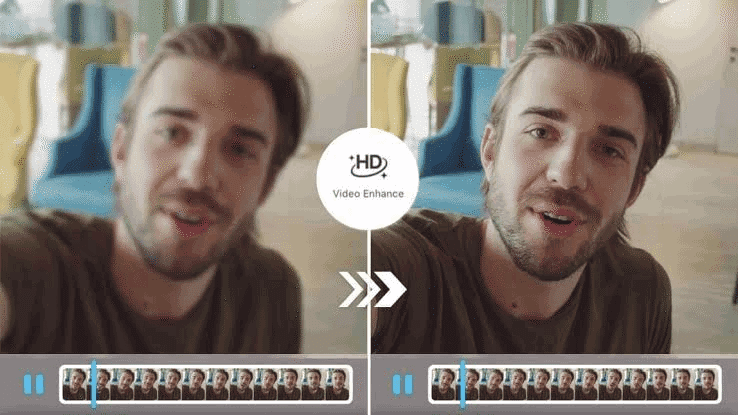
Drag and drop your footage into our online enhancer. We support MP4 and MOV formats up to 15 seconds long.
Our advanced AI analyzes your clip frame by frame, automatically enhancing clarity, adjusting dynamic contrast, and unblurring details in real time.
Use our interactive comparison slider to inspect the crystal-clear results, then download your unblurred, watermark-free video instantly.
No more wrestling with soft focus or low-resolution footage. Our AI model spots blurry areas on its own, clears up pixelation, and sharpens your video with a single click.
Unblur VideoBeforeAfterReal restoration takes more than a sharpening filter. The AI works through your video frame by frame, rebuilding lost detail, tightening soft edges, bringing out fine textures, and lifting dim, poorly lit scenes.
Unblur VideoSharpen your video without touching anything else. When you unblur a video with FreeMaker, the audio, aspect ratio, frame rate, and clip length all stay exactly as they were—no surprise changes, no distortion.
Unblur Video BeforeAfter
See the difference before you hit download. A side-by-side slider lets you drag through the footage and check every detail, while the tool handles color, brightness, and transparency in the background.
Unblur Video BeforeAfter
Give old memories a second life. Clean up vintage camcorder tapes, grainy 90s home videos, out-of-focus phone clips, or any low-quality recording sitting in your archive.
Unblur Video BeforeAfter
Built to fit into your workflow. Import and export standard MP4 and MOV files, so your cleaned-up videos drop straight into your editor or upload to social platforms without extra conversion steps.
Unblur Video BeforeAfter
Skip the heavy desktop editors. Just open your browser, upload your clip, and unblur video files right on the spot—nothing to install, nothing to set up.
Drag the slider to see exactly what changed before you download. It's a quick way to check the results after you unblur video footage, so you know what you're getting.
Optimized for videos up to 15 seconds, FreeMaker can unblur video clips in seconds—perfect for social posts, reels, and other short-form content where speed matters.
Your files are yours. Every upload is encrypted and wiped from our servers automatically. We don't share your videos, and we never use them to train AI models.
Want to test it first? Go ahead and unblur video clips with the full AI enhancer at no cost—no credit card, no commitment.
Download your finished video in high definition, watermark-free, with 100% commercial usage rights included.
Shooting daily vlogs or on-the-go clips? Unblur video footage before you upload, so your raw takes end up looking clean and polished instead of soft and shaky.
Phone footage doesn't always come out sharp. Unblur video clips in seconds and turn so-so smartphone shots into crisp content that actually holds attention on TikTok, Reels, and YouTube Shorts.
Promo videos and campaign assets need to look the part. Sharpen up blurry product shots and B-roll to give your marketing content the clean, professional finish clients expect.
Webinars, talking-head clips, corporate updates—they all land better when the footage looks sharp. Unblur video content before posting so your personal brand comes across polished and credible.
Got old home videos or camcorder tapes sitting around? Unblur video recordings from the 90s, family archives, and other vintage footage to bring them back in modern HD quality.
Had an important interview recording that came out totally out of focus—thought the whole thing was ruined. Ran it through FreeMaker Unblur Video and got it cleaned up in under a minute. MP4 handled without a hitch. Honestly saved the project.
Marcus T.
Content Creator
I deal with low-res MOV clips pretty much every day, and FreeMaker Unblur Video is the best tool I've found for the job. It sharpens up the footage without messing with the original colors, which matters a lot when you're posting for brands.
Elena R.
Social Media Manager
Cleaning up old family videos used to be such a headache. With FreeMaker Unblur Video I managed to fix footage from my parents' wedding and the clarity genuinely surprised me. Fast, straightforward, and I like that they take privacy seriously.
David K.
Family Archivist
Product visuals can make or break a listing. I shoot most of my promos on my phone, and FreeMaker Unblur Video takes those slightly soft clips and turns them into sharp, HD-quality shots I can actually use on my store.
Sarah L.
E-Commerce Seller
I record a lot of tutorials, and pixelated screen captures are the worst. FreeMaker Unblur Video fixes my lessons in no time whenever the recording quality dips. The credit system is easy to work with too—no complicated setup.
Jason M.
Online Instructor
Having a quick online option like FreeMaker Unblur Video has honestly been a lifesaver on tight deadlines. I love the side-by-side preview—I can see exactly what I'm getting before I spend credits exporting the final file.
Rachel P.
Videographer
 BeforeAfter
Create festive holiday portraits and Christmas card photos in up to 4K resolution.

Transform photos and prompts into cinematic 4K superhero artwork.

Design custom heraldic crests with shields, symbols, and mantling.

Blend multiple photos into one cohesive AI-generated scene.

Create custom 2D paper-cutout avatars from a photo or prompt.

Extend video length, continue the scene, and download watermark-free clips.
Upload your video and let FreeMaker AI sharpen it online—no install, no watermark, full HD output.
Unblur Video Free